


Smartsheet adds Claude Sheets transfer in Australia
Wed, 11th Nov 2026 (Today)
Smartsheet has launched an integration with Claude Sheets in Australia, allowing users to send AI-generated sheets from Claude into Smartsheet.
The new Send to Smartsheet function, available through the Smartsheet connector for Claude, is designed to move work created in Anthropic's Claude into Smartsheet, where teams manage projects and workflows.
Users can transfer trackers, budgets and plans directly into Smartsheet using their existing login. The process preserves the sheet's structure, including dates, numbers and dropdown fields, and creates a new sheet in the selected workspace.
The move reflects a broader issue for companies adopting generative AI tools: work often starts in a chatbot or AI spreadsheet environment, but teams still need to move it into established systems for collaboration, tracking and approvals.
In Smartsheet, the imported sheet can be assigned to team members, linked to projects or portfolios, and used in dashboards, reports and automated workflows. People who do not use Claude can still take part once the work is inside Smartsheet.
That includes contributors responding to update and approval requests by email, with their responses written back into the sheet. Claude can also continue working with the imported sheet through the connector, including adding formulas, formatting and hierarchy, and using Smartsheet AI tools to build automations, dashboards and reports.
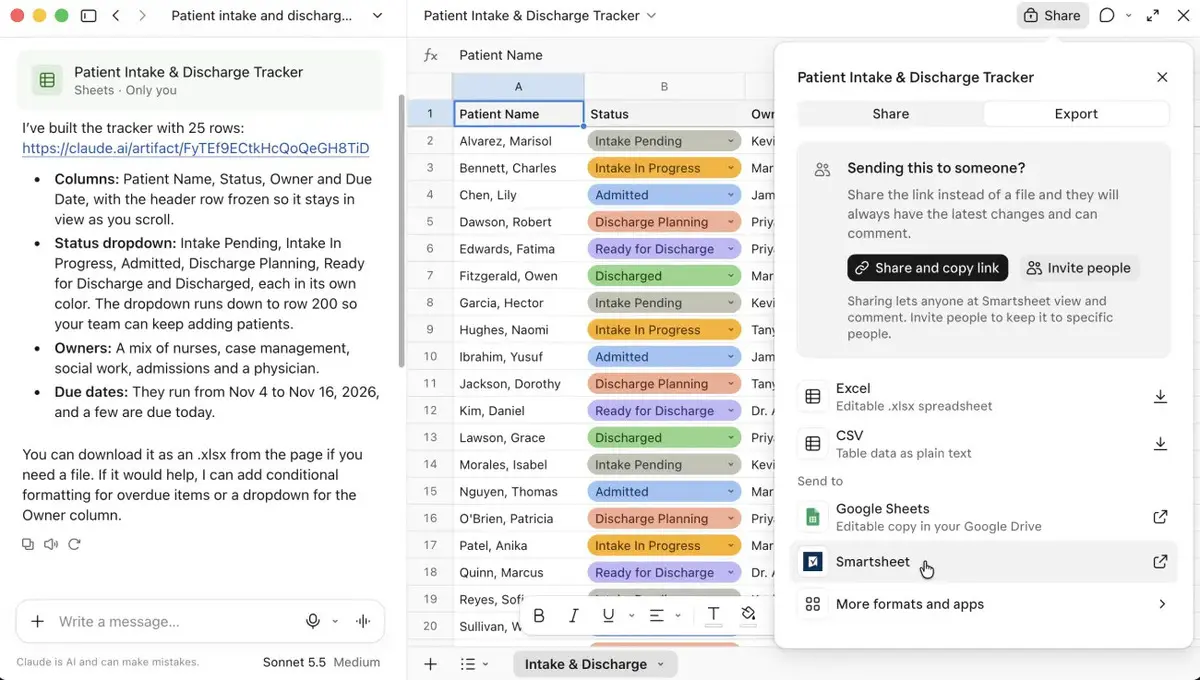
Anthropic's Claude Sheets is described as a spreadsheet artefact within Claude that lets users build a first draft of a plan or tracker in spreadsheet format. Smartsheet's addition is intended to reduce the need to re-enter data when teams want to move that work into a business workflow tool.
"Claude Sheets is a fast, easy way to get a first draft done, and Smartsheet is where your whole team picks it up from there," said Drew Garner, Chief AI Officer at Smartsheet.
"You describe the work and Claude builds the sheet, fast and remarkably well. Bring it into Smartsheet, and it plugs into your team's workflow - with owners, discussions, dashboards, automations, and scheduled agents, and people reviewing and approving along the way. Getting serious work done requires context, teamwork, governance and security. Pairing the familiarity of a spreadsheet and the power of Claude with the context of the Smartsheet Execution Graph means many people and many agents can work from one shared system," Garner said.
Workflow link
The new feature extends Smartsheet's existing connector for Claude, which already allows users to bring live work data, dashboards, discussions and workflows into Claude conversations. Work sent from Claude remains under the same permissions and approval controls used elsewhere in Smartsheet.
According to Smartsheet, AI agents using the platform can see or change only what the relevant user is allowed to access. It also said customer data remains within the customer's permission framework and that its third-party AI provider agreements do not allow customer content to be used to train foundation models.
The company linked the launch to its wider "Execution Graph", which it describes as a system for mapping relationships between tasks, projects, programmes and strategic goals. In practice, that means a sheet created in Claude and moved into Smartsheet can be attached to existing planning structures rather than remaining a standalone file.
AI adoption
Smartsheet said it connects 277 billion rows of work data each month. It also said AI actions on its platform have grown by more than 700% since the launch of its MCP Server in March 2026, and that its Agentic Workflows currently run on Anthropic models.
The Australian launch is part of a wider rollout that also includes the US and EU. Each transfer requires the user to choose a destination workspace, where the Claude sheet is then created as a new Smartsheet file.
One example offered by the company was a marketing lead creating a product launch tracker in Claude Sheets, sending it to Smartsheet, assigning tasks across teams, and collecting delivery date updates from an outside agency by email without requiring that agency to log into the system.
Once the data is in Smartsheet, Claude can also answer follow-up questions based on the live sheet, according to the company. That gives users a way to continue working in the same AI conversation after the sheet has been moved into a team environment.
Work that arrives from Claude follows the same permissions and approvals as everything else in the platform.